

Add Watermark & Resize:
画像の「リサイズ・透かし・形式変換」を一括処理
Batch resize, watermark, and convert your images

Add Watermark & Resize は、3つの作業をドラッグ&ドロップ一発でまとめて片付けるWindows用フリーソフトです。設定はプリセットとして保存できるので、2回目からは「画像を放り込んで実行を押すだけ」。ブログなどの画像作成のルーチンワークを数秒に短縮します。
Add Watermark & Resize is a free Windows app that handles three jobs in a single drag & drop. Your settings are saved as presets, so from the second time on it’s just “drop the images and hit Run.” A routine that used to take minutes now takes seconds.
こんな方におすすめ Who it’s for
- ブログやサイトに載せる写真へ、毎回同じ透かし(クレジット・ロゴ)を入れている
You add the same watermark (credit / logo) to every photo you publish - 記事用に画像を決まったサイズへ縮小してからアップロードしている
You shrink images to a fixed size before uploading them to articles - JPGやスマホのHEIC写真を、軽いWebPに変換して使いたい
You want to convert JPG or smartphone HEIC photos into lightweight WebP - 無断転載対策と表示速度改善を、手間をかけずに両立したい
You want anti-copy protection and faster page loads without the busywork
主な機能 Features
一括処理 Batch processing
複数の画像をまとめてドラッグ&ドロップ。フォルダごとのドロップや、あとからの追加もOK。
Drop multiple images at once ? folders too, and you can keep adding more.
元ファイルはそのまま、別名(例:photo.png → photo_sukasi.webp)で出力します。
Each image is saved under a new name (e.g. photo.png → photo_sukasi.webp); your originals are never touched.
透かし入れ Watermarking
透過PNGの透かしを、透明度を保ったまま合成します。位置は9つの基準点+縦横マージンで指定、大きさは「出力画像に対する%」で指定するので、縦写真でも横写真でも見た目の比率が揃います。
Composites transparent PNG watermarks with their transparency preserved. Position is set with 9 anchor points plus H/V margins, and size is specified as a percentage of the output image ? so the proportions look consistent on portrait and landscape shots alike.
回転や、不透明度の調整にも対応。
Rotation and opacity adjustment are supported.
リサイズ Resizing
アスペクト比を維持したまま、長辺/短辺/縦/横のいずれかを基準にピクセル指定。
Keeps the aspect ratio, with the target size applied to the long side, short side, width, or height.
「縮小のみ(拡大しない)」オプション付きで、小さい画像を無理に引き伸ばしません。リサイズせず透かしだけ入れることもできます。スマホ写真の向き(EXIF回転)も自動で正します。
A “shrink only” option prevents small images from being blurrily upscaled, and resizing can be turned off entirely to apply only the watermark. Smartphone photo orientation (EXIF) is corrected automatically.
形式変換 Format conversion
出力はPNG / JPG / BMP / WebP / GIF / TIFFに対応。JPG・WebPは品質スライダー付き。
Outputs PNG / JPG / BMP / WebP / GIF / TIFF, with a quality slider for JPG and WebP.
入力はHEICやAVIFを含む主要な画像形式を幅広く読み込めます。アニメGIF・アニメWebPは全フレームまとめて処理。
Reads a wide range of input formats including HEIC and AVIF. Animated GIF / WebP files are processed frame by frame.
プリセット Presets
透かし・リサイズ・出力の設定一式を最大10個まで保存。「ブログ用」「SNS用」のように使い分けられ、起動時には前回のプリセットを自動で呼び出します。
Save up to 10 complete setting sets ? “for the blog”, “for social media”, and so on. The last used preset is loaded automatically at startup, and presets can be backed up and restored.
プライバシー保護 Privacy-friendly by design
出力画像からはEXIF(撮影日時・GPS位置情報など)を自動削除。うっかり個人情報ごと公開してしまう事故を防ぎます。同名ファイルがあるときは上書き/連番/スキップを選択可能。
EXIF metadata (shooting date, GPS location, etc.) is stripped from every output file, so you never accidentally publish personal data. When a filename collides, you choose: overwrite, add a number, or skip.
動作環境 System requirements
ライセンス・利用条件 License / Terms of use
ダウンロード Download


クイックスタート Quick Start
インストーラ形式です。ダウンロードしたexeを実行し、画面の指示に従ってください。
Installer format: run the downloaded exe and follow the instructions.
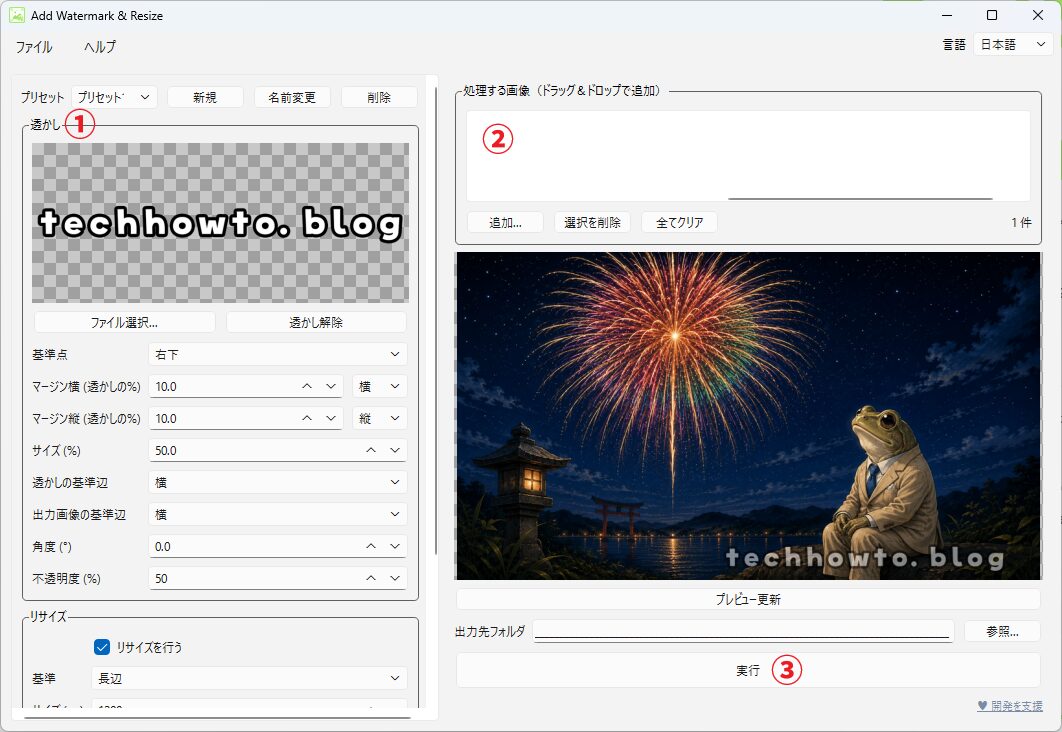
- 透かし画像(透過PNG)を登録して、サイズや位置を設定
Register your watermark image (transparent PNG) and set its size and position - 処理したい画像をまとめてドラッグ&ドロップ
Drag & drop the images you want to process - プレビューで確認して「実行」
Check the preview and hit “Run”
不具合報告・ご要望 Bug reports / Requests
当サイトのお問い合わせページまたはXアカウントまでお寄せください。可能な範囲で対応しますが、サポートや修正をお約束するものではない点はご了承ください。
Please use the contact page on this site, or the X account listed here. Responses are provided where possible, but support is not guaranteed.
更新履歴 History
1.0.0 (2026/07/28)
初回リリース
Initial release